PolyDriveのアイコン

お使いのクラウドドライブを
Finderにマウント。

Every drive becomes a real folder — Finder opens it, and so does your AI agent. One Mac app for every storage account — cloud object storage, WebDAV/SFTP/FTP servers, sign-in drives like Dropbox, Box and Google Drive — plus the SMB shares and Android phones on your own desk. All native Finder locations, no browser tabs required.

Appleシリコン & Intel · macOS 15.4以降 · クラウドドライブ2台まで無料、共有・スマートフォン・ディスクは無制限

サーバなし。アカウントなし。分析なし。PolyDriveはあなたのMacを、あなたが選んだストレージに直接つなぎます。ファイルも認証情報も利用状況も、私たちには一切見えません。

Product Guide

Which PolyDrive do you need?

PolyDrive comes in two dedicated editions. Choose based on where your storage lives: remote in the cloud and network, or physical external disks right on your desk.

PolyDriveのアイコン

PolyDrive

Cloud & Network

Mount cloud drives, object storage buckets, and remote network servers directly into Finder as native folders.

  • ☁️ Cloudflare R2, Amazon S3, Backblaze B2, Google Cloud, Azure
  • 🔑 Dropbox, Google Drive, OneDrive, Box, MEGA, pCloud
  • 🌐 WebDAV, SFTP, FTP, Seafile, OpenList / Alist self-hosted servers
  • 🗄️ Local SMB network shares and Android phones over USB (MTP)
  • 📁 Native Apple File Provider framework with on-demand streaming
PolyDrive Disk icon

PolyDrive Disk

Physical Disks & USB

Read and write Windows NTFS and Linux file systems on external hard drives, SD cards, and USB thumb drives.

  • 💽 Full read & write on Windows NTFS external drives and USB sticks
  • 🐧 Full read & write on Linux ext4, ext3, ext2, Btrfs, XFS, and F2FS
  • 🔐 Decrypt LUKS1, LUKS2, and Windows BitLocker volumes natively
  • 🧱 Assemble single-disk LVM volumes and NAS RAID 1 array members
  • 🛡️ 100% sandboxed Apple FSKit architecture, zero kernel extensions
Dimension
PolyDrive Cloud & Network
PolyDrive Disk Physical Disks & USB
Your Needs
Manage cloud storage & servers in Finder
Direct access to S3/R2 object storage, WebDAV, SFTP, SMB shares, and Android phones without saving everything locally.
Read & write external hard drives and USB sticks
Solves read-only Windows NTFS drives on Mac, plus full support for Linux (ext4, Btrfs, XFS) disks and encrypted volumes.
Where Files Live
Remote in the cloud or across the local network
Stored on cloud provider infrastructure, remote servers, office network shares, or home NAS devices.
Right beside you, plugged directly into your Mac
Physical hard drives, SSDs, USB flash drives, or SD cards connected via USB or Thunderbolt cable.
Underlying Tech
Network Storage Protocols (Apple File Provider)
S3, WebDAV, SFTP, SMB, MTP · Streams contents on demand with zero local disk footprint.
Disk File Systems (Apple FSKit Architecture)
NTFS, ext4, Btrfs, XFS, F2FS · 100% sandboxed Apple FSKit drivers with high-speed full read/write.
Finder Presence
Native folders in Finder sidebar (Locations)
Behaves just like standard macOS folders; files download transparently when opened.
Real disk volumes on Desktop and Finder
Appears as native mounted disk drives; supports drag-and-drop file transfers at full bus speed.
How to Get Free download on Mac App Store ↓ Visit PolyDrive Disk →
機能

どのストレージも、同じ手順でマウント

一度追加すれば、あとは他のFinderの場所と同じです。別のアプリも同期フォルダもなしに、参照・オープン・編集・保存ができます。

☁️

クラウドオブジェクトストレージ

Cloudflare R2、Amazon S3、Backblaze B2、Wasabi、IDrive e2、MinIO、Azure Blob Storage、Alibaba Cloud OSS、Tencent Cloud COS、Google Cloud Storage — エンドポイントとアクセスキーで接続します。

🔑

自分のアカウントでサインイン

Dropbox、OneDrive、Googleドライブ、Box、pCloud、Tencent Weiyun(微云)は、システムのブラウザで各サービス自身のサイトにサインインします。Koofr と Nutstore(坚果云)はそこで作成するアプリ用パスワードを使います。

🌐

セルフホストのサーバ

Nextcloud、ownCloud、Seafile、OpenList/Alist、あるいは通常のWebDAV・SFTP・FTPサーバ — アドレスを指定するだけで、他のドライブと同じようにFinderに現れます。SFTPは初回接続時にサーバのホストキーを記憶し、後から変わった場合は警告します。

🗄️

SMBネットワーク共有

NASや別のMacの共有を追加すると、PolyDriveはログイン時にマウントし、ネットワークが切れて外れてもまたマウントし直します。パスワードはマウント前に確認するので、打ち間違いはシステムのダイアログではなくPolyDrive上のメッセージになります。

📱

Androidスマートフォンとタブレット

USBでつなぐだけで、MTP経由でFinderから参照できます。双方向のコピー、名前の変更、削除に加えて、端末上の動画をそのまま再生することもできます。macOSが既にその端末を使っている場合は、PolyDriveはそれを経由して動作するので、何かを終了させる必要はありません。

📦

フォルダを転送

小さなファイルが一万件あるフォルダは、Finder 経由だと時間がかかります。PolyDrive はフォルダごと転送し、サービスが許す範囲でできるだけ多くの転送を並行して行います。それが許されるサービスなら最大で約 7 倍高速、途中で止めても再開でき、クラウド間の転送にも使えます。

📌

必要なものはオフラインでも

ファイルまたはフォルダを右クリックして Keep Available Offline(オフラインで使えるように保持)を選ぶと、ダウンロードされたまま保持されます。飛行機の中でもホテルの弱い回線でも開けますし、フォルダに対して行えば中身もすべて一緒に降りてきます。Finder のピンのバッジが保持中の項目を示し、Stop Keeping Offline で容量が戻ります。

📁

本物のFinderの場所

どのドライブも、AppleのFile Providerフレームワークを通じてFinderサイドバーの「場所」に現れます。仮想ディスクでも、バックグラウンドで動く同期クライアントでもありません。

🔍

Spotlight から検索

Spotlight を開いて探したい語句を入力し、PolyDrive を検索 を選ぶと、結果をマウント中のクラウドドライブに絞り込めます。さらに 1 つのドライブだけに絞ることもできます。どのドライブの項目かは結果に表示されます。macOS 26 以降が必要です。

🔒

データはあなたのもののまま

バックエンドなし、PolyDriveアカウントなし、分析なし。認証情報とトークンはMacのキーチェーンの中だけに保存されます。プライバシーポリシーを読む →

Looking for local disk support (NTFS, ext4, Btrfs, XFS)? External disks have moved to our dedicated companion app: PolyDrive Disk →. Existing PolyDrive user? If you need ext4 support, email us at [email protected] to get a lifetime license for PolyDrive Disk for just $4.99 — with full read and write support for both NTFS and ext4.

スクリーンショット

ウインドウは1つ。ドライブはすべてFinderに。

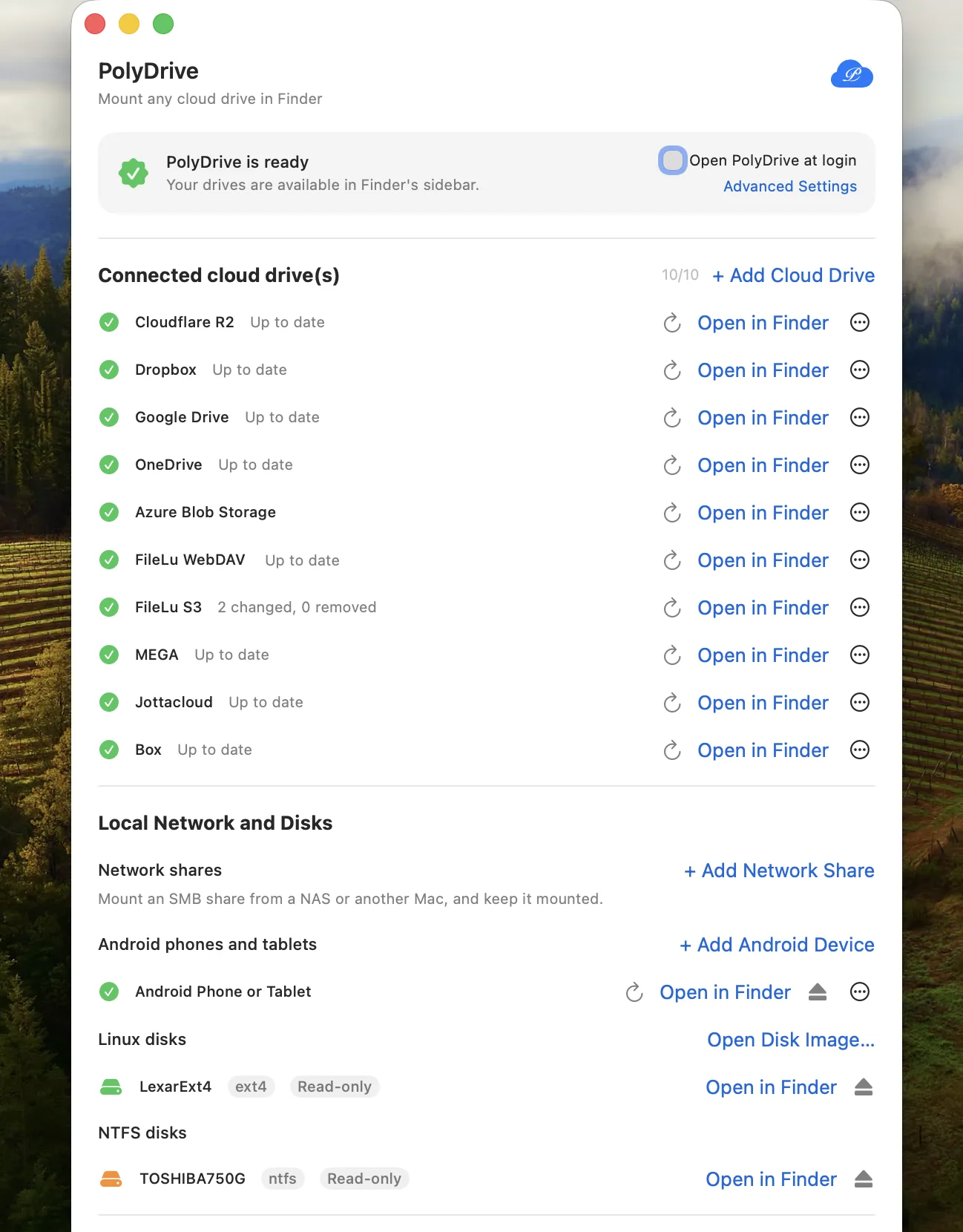
接続の管理はPolyDrive自身のウインドウで。ドライブはFinderが他の場所を並べているところに、そのまま現れます。

PolyDrive window listing ten connected cloud drives — including Cloudflare R2, Dropbox, Google Drive, OneDrive, MEGA, Jottacloud and Box — plus an Android phone
Cloud drives and connected devices, ready in Finder
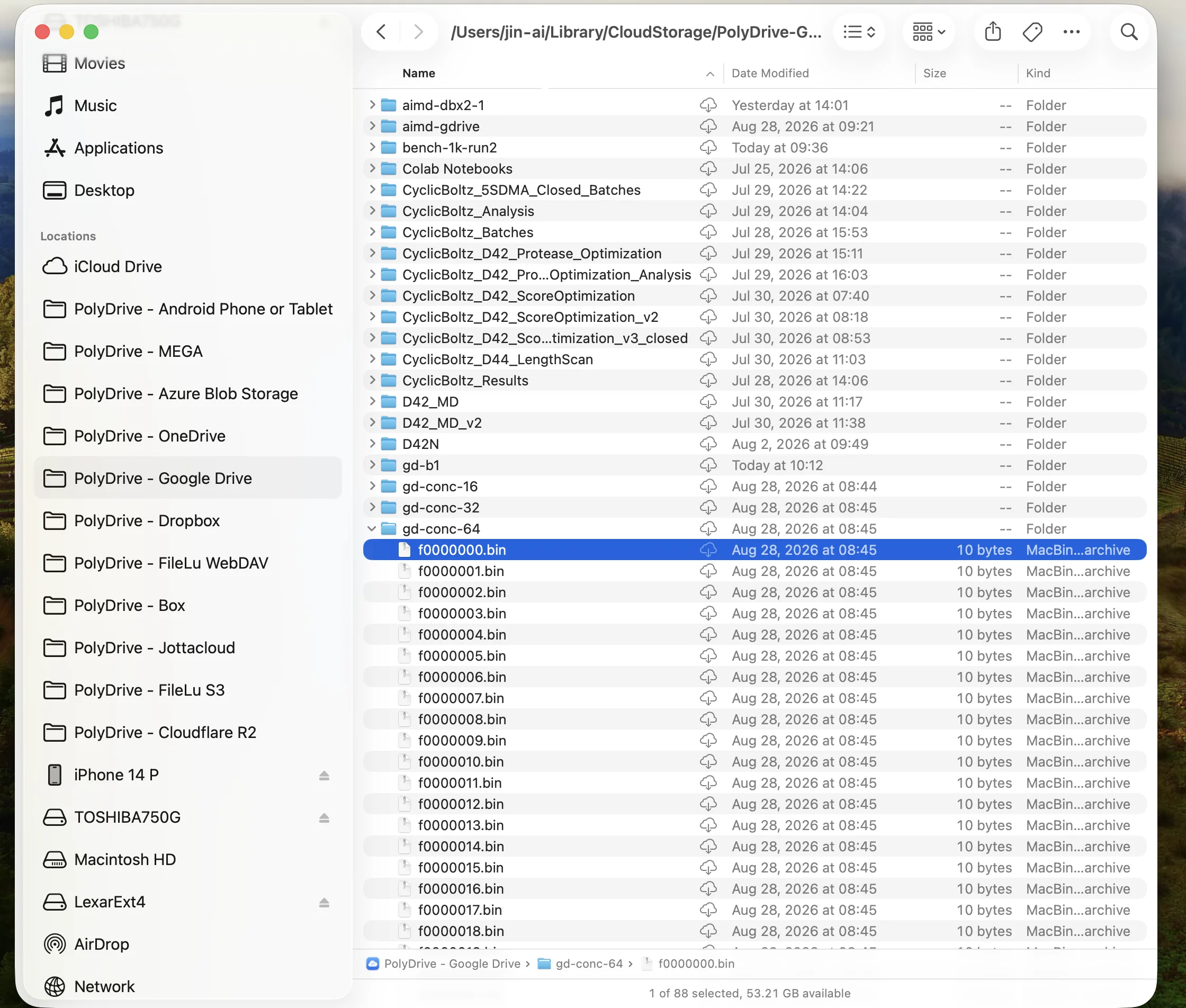
iCloud Driveと並んで10個のPolyDriveの場所(MEGA、Box、Jottacloudなど)が表示されたFinderのサイドバーと、ファイル一覧に開かれたGoogleドライブのフォルダ
ネイティブなFinderの場所 — ローカルフォルダと同じように参照・オープン・編集
ストレージ事業者

ストレージは自分のものを

PolyDriveには独自のアカウントがありません。追加するドライブは、すべてあなたが既に使っているサービスです。

Cloudflare R2 Amazon S3 Backblaze B2 Wasabi IDrive e2 DigitalOcean Spaces Scaleway Storj MinIO + S3 互換をさらに 9 種 Azure Blob Storage Azure Files Alibaba Cloud OSS Tencent Cloud COS Google Cloud Storage Huawei OBS OpenStack Swift Dropbox OneDrive Googleドライブ Box Koofr MEGA Jottacloud pCloud Yandex Disk Nutstore(坚果云) Tencent Weiyun(微云) Infomaniak kDrive Nextcloud / ownCloud WebDAV SFTP FTP / FTPS Seafile OpenList / Alist SMB共有 Android端末(MTP)

このリストにないものが必要ですか。rclone が届くものの多くは 10 分ほどで Finder につなげます →

しくみ

macOSには何もインストールしません

PolyDriveはAppleのFile Providerフレームワーク、つまりiCloud Driveを支えているのと同じしくみの上に作られています。以下がすべて成り立つのは、その選択のおかげです。(SMB共有だけは例外で、macOS自身のSMBクライアントがボリュームとしてマウントします。だからこそ、ネットワーク上の他の共有とまったく同じように振る舞います。)

カーネル拡張もmacFUSEも不要

システム機能拡張の承認も、SIPの変更も、再起動も要りません。壊れるドライバがそもそも存在しないので、macOSがアップデートされても入れ直すものはありません。

マウントされたボリュームではない

ドライブはFinderサイドバーの場所に本物のフォルダとして現れます。検索でき、開けて、つなぎっぱなしにしても安全です。取り出すべき仮想ディスクはありません。

同期ではなくストリーミング

ファイルの中身は必要な範囲だけを必要なときに取得します。バケット上の4 GBの動画を開いても、先に4 GBをダウンロードすることはなく、SSDはあなたのために残ります。

手元に残しておきたいものは指定できます。Finder の右クリックメニューの Keep Available Offline は、ファイル(またはフォルダまるごと)をダウンロードし、そのまま保持します。

事業者へ直接

経路上にPolyDriveのサーバはありません。そもそも存在しないのです。あなたのMacがあなたのストレージと直接やり取りし、認証情報はキーチェーンから出ません。

Finderにマウントする他のアプリと比べてどうなのか、気になりますか。正直な比較を書きました(英語) →

マウントは初めて、あるいは同期と何が違うのか気になりますか? 「コピーではなくフォルダ」という理由から読む(英語)→

PolyDriveを入手

ダウンロードは無料、そのまま使い続けるのも無料 — クラウドドライブ2台に加えて、ネットワーク共有・スマートフォン・ローカルディスクは好きなだけ。

macOS 15.4以降が動作するMac(AppleシリコンまたはIntel)が必要です。

Mac App StoreでPolyDriveを見る