PolyDrive icon

Mount any cloud drive
in Finder.

Every drive becomes a real folder — Finder opens it, and so does your AI agent. One Mac app for every storage account — cloud object storage, WebDAV/SFTP/FTP servers, sign-in drives like Dropbox, Box and Google Drive — plus the SMB shares, Android phones and Linux disks on your own desk. All native Finder locations, no browser tabs required.

Apple Silicon & Intel · macOS 15.4 or later · Free for two cloud drives, and every share, phone and disk

No servers. No accounts. No analytics. PolyDrive connects your Mac directly to the storage you choose — we never see your files, credentials, or activity.

Features

Everything mounts the same way

Add a drive once, and it behaves like any other Finder location — browse, open, edit, and save, without a separate app or sync folder.

☁️

Cloud object storage

Cloudflare R2, Amazon S3, Backblaze B2, Wasabi, IDrive e2, MinIO, Azure Blob Storage, Alibaba Cloud OSS, Tencent Cloud COS, and Google Cloud Storage — connect with an endpoint and access key.

🔑

Sign in with your account

Dropbox, OneDrive, Google Drive, Box, pCloud and Tencent Weiyun sign in on the service's own site, through your system browser. Koofr and Nutstore (Jianguoyun) use an app password you create there.

🌐

Self-hosted servers

Nextcloud, ownCloud, Seafile, OpenList/Alist, or any plain WebDAV, SFTP or FTP server — point PolyDrive at it and it shows up in Finder like any other drive. SFTP pins the server's host key the first time, and warns you if it ever changes.

🗄️

SMB network shares

Add a share from a NAS or another Mac and PolyDrive mounts it when you log in — and mounts it again whenever the network drops it. The password is checked before mounting, so a typo is a message in PolyDrive, not a system dialog.

📱

Android phones and tablets

Plug one in over USB and browse it in Finder over MTP: copy both ways, rename, delete, and play a video straight off the phone. If macOS has already claimed the device, PolyDrive works through that instead of asking you to quit anything.

💽

Local Linux disks

Mount ext2/ext3/ext4 disk images and Raspberry Pi SD cards read-only, right from Finder — drag one onto the menu bar icon and it's browsable.

📦

Transfer a folder

A folder of ten thousand small files takes a long time through Finder. PolyDrive moves the whole thing instead, opening as many parallel transfers as the service will take — up to about 7× faster where the service allows it, resumable if you stop it, and it works cloud to cloud too.

📌

Keep what you need offline

Right-click a file or folder and choose Keep Available Offline. It is downloaded and kept that way, so it opens on a plane or a bad hotel connection — pin a folder and everything inside it comes too. A pin badge in Finder shows what is being kept, and Stop Keeping Offline hands the space back.

📁

Real Finder locations

Every drive appears under Finder's Locations sidebar via Apple's File Provider framework — not a virtual disk, not a sync client running in the background.

🔍

Search from Spotlight

Open Spotlight, type what you are looking for, and choose Search PolyDrive to narrow the results to your mounted cloud drives — then to a single drive if you want. Every result says which drive it came from. Requires macOS 26 or later.

🔒

Your data stays yours

No backend, no PolyDrive account, no analytics. Credentials and tokens live only in your Mac's Keychain. Read the privacy policy →

Screenshots

One window. Every drive in Finder.

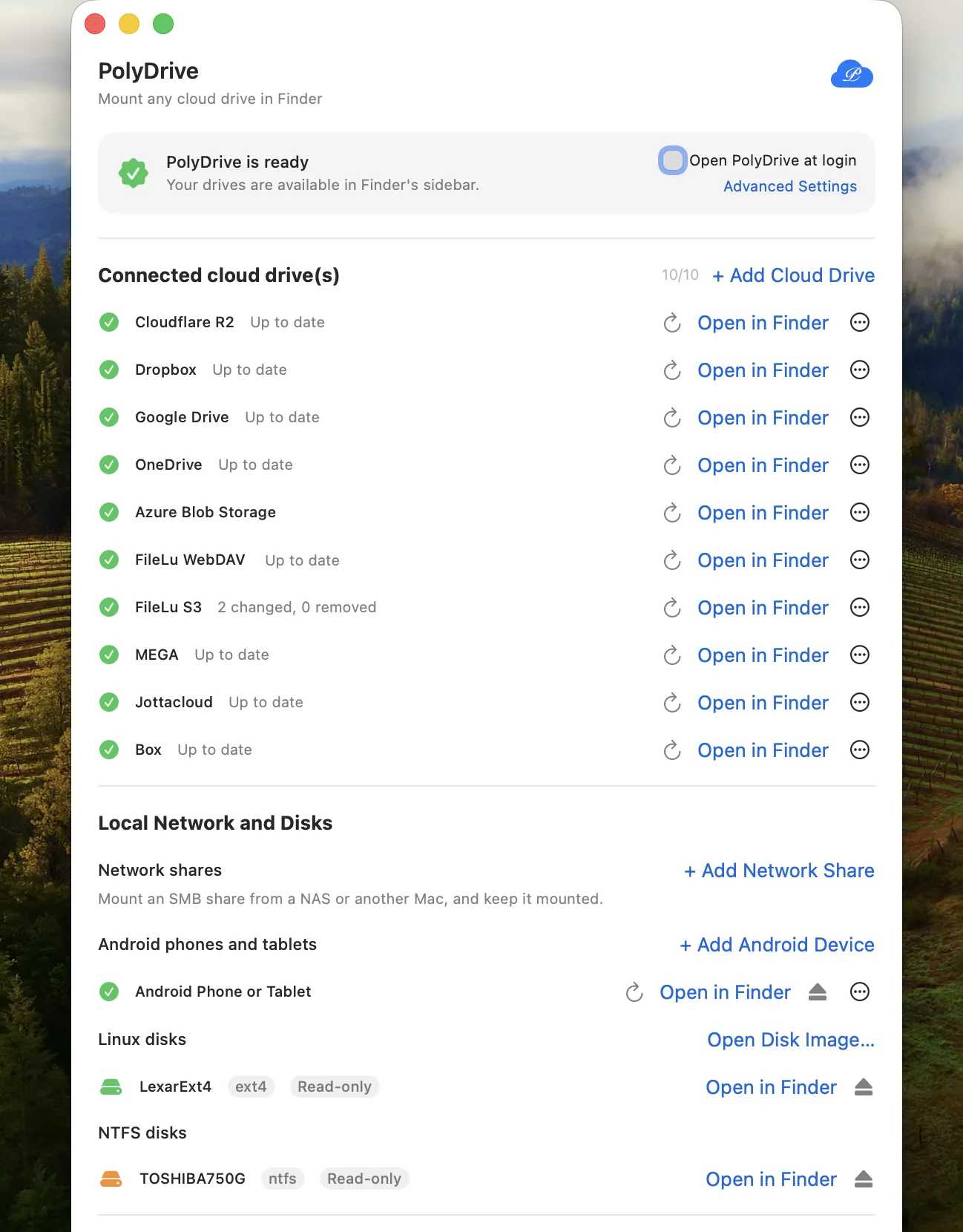
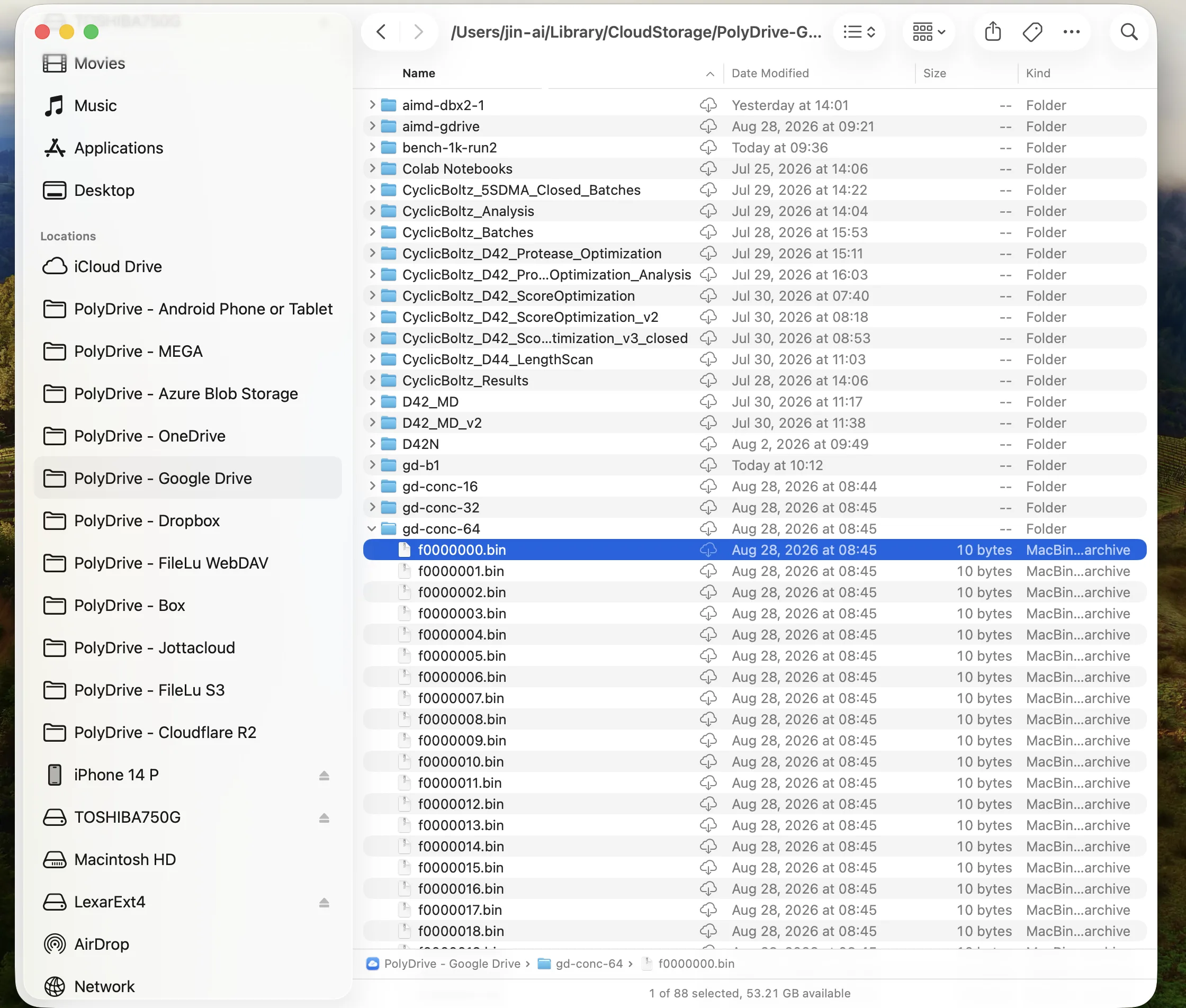
Manage every connection from PolyDrive's own window, then find every drive right where Finder already puts your other locations.

PolyDrive window listing ten connected cloud drives — including Cloudflare R2, Dropbox, Google Drive, OneDrive, MEGA, Jottacloud and Box — plus an Android phone and local ext4 and NTFS disks mounted read-only
Cloud drives and local disks, connected and ready
Finder sidebar showing ten PolyDrive locations alongside iCloud Drive — including MEGA, Box and Jottacloud — with a Google Drive folder open in the file list
Native Finder locations — browse, open, and edit like any local folder
Storage vendors

Bring your own storage

PolyDrive has no accounts of its own — every drive you add is a service you already use.

Cloudflare R2 Amazon S3 Backblaze B2 Wasabi IDrive e2 DigitalOcean Spaces Scaleway Storj MinIO + 9 more S3-compatible Azure Blob Storage Azure Files Alibaba Cloud OSS Tencent Cloud COS Google Cloud Storage Huawei OBS OpenStack Swift Dropbox OneDrive Google Drive Box Koofr MEGA Jottacloud pCloud Yandex Disk Nutstore (Jianguoyun) Tencent Weiyun Infomaniak kDrive Nextcloud / ownCloud WebDAV SFTP FTP / FTPS Seafile OpenList / Alist SMB shares Android phones (MTP) ext2 / ext3 / ext4

Need something that isn't on this list? Most of what rclone reaches can be bridged into Finder in about ten minutes →

How it works

Nothing installed into macOS

PolyDrive is built on Apple's File Provider framework — the same one behind iCloud Drive. That decision is the reason everything below is true. (SMB shares are the one exception: those are mounted as volumes by macOS's own SMB client, which is also why they behave exactly like any other share on your network.)

No kernel extension, no macFUSE

No system extension approval, no SIP changes, no reboot. Nothing to reinstall the next time macOS updates, because there is no driver to break.

Not a mounted volume

Drives appear under Finder's Locations sidebar as real folders — searchable, openable, and safe to leave connected. No virtual disk to eject.

Streamed, not synced

File contents are fetched on demand in ranges. Opening a 4 GB video from a bucket doesn't download 4 GB first, and your SSD stays yours.

When you want something to stay, say so: Keep Available Offline in Finder's right-click menu downloads a file — or a whole folder — and keeps it downloaded.

Direct to your provider

There is no PolyDrive server in the path — none exists. Your Mac talks to your storage, and credentials never leave your Keychain.

Wondering how that stacks up against the other Finder-mounting apps? We wrote an honest comparison →

New to mounting, or wondering how it differs from sync? Start with why a folder beats a copy →

Get PolyDrive

Free to download, and free to keep — two cloud drives, and as many network shares, phones and local disks as you like.

Requires a Mac (Apple Silicon or Intel) running macOS 15.4 or later.

PolyDrive on the Mac App Store